> ## Documentation Index
> Fetch the complete documentation index at: https://runway.duncanmcclean.com/llms.txt
> Use this file to discover all available pages before exploring further.
# Resources
> Resources are a core part of Runway. They tell Runway about your Eloquent models and how you'd like them to be managed.
## What are resources?
For each of the Eloquent models you wish to use with Runway, you’ll need to define a ‘resource’.
A resource basically tells Runway about the model and how you’d like it to be configured - which blueprint to use, whether it should be manageable in the CP, etc.
## Defining resources
There are three steps involved in defining a resource:
Add the resource to Runway's config file. The key should be the model, and the value should be an array of configuration options:
```php config/runway.php theme={null}
'resources' => [
\App\Models\Order::class => [
'name' => 'Orders',
],
],
```
Add the `HasRunwayResource` trait to your Eloquent model:
```php app/Models/Order.php theme={null}
use StatamicRadPack\Runway\Traits\HasRunwayResource; // [!code ++]
class Order extends Model
{
use HasRunwayResource; // [!code ++]
}
```
Finally, you can start adding fields to your resource's blueprint. To learn more about using Blueprints in Runway, please review the [Blueprints](/blueprints) page.
If you're moving a collection to the database, use the `php please runway:import-collection` command. It'll help you set up everything you need, including moving your entries to the database.
## Configuring resources
There’s about a dozen configuration options available for resources, they are all documented below.
### Hidden
By default, Runway provides a Control Panel interface for managing your models.
If you’d like to hide the CP Nav Item that’s registered for this model, just say so:
```php theme={null}
'resources' => [
\App\Models\Order::class => [
'name' => 'Orders',
'hidden' => true,
],
],
```
This will only hide the resource from the Control Panel navigation, the page will still be accessible via its URL if you know where to look. If you want to prevent access to the resource entirely, use [permissions](/control-panel#permissions) instead.
### Route
If you want to take advantage of Runway’s front-end routing abilities, you can pass in a `route` to enable it.
Your `route` can include Antlers code - the variables available are driven by the resource’s blueprint.
```php theme={null}
'resources' => [
\App\Models\Order::class => [
'name' => 'Orders',
'route' => '/my-orders/{{ id }}',
],
],
```
### Templates & Layouts
You may also specify the `template` and `layout` you want to use when front-end routing.
```php theme={null}
'resources' => [
\App\Models\Order::class => [
'name' => 'Orders',
'route' => '/my-orders/{{ id }}',
'template' => 'orders.show',
'layout' => 'default',
],
],
```
### Read Only
You may also specify if you want a resource to be 'read only' - eg. users will not be able to create models and when editing, all fields will be marked as read only and no save button will be displayed.
```php theme={null}
'resources' => [
\App\Models\Order::class => [
'name' => 'Orders',
'read_only' => true,
],
],
```
### Duplicatable
By default, Runway allows models to be duplicated via the Duplicate action in the Control Panel. You can disable this for a resource by setting `duplicatable` to `false`.
```php theme={null}
'resources' => [
\App\Models\Order::class => [
'name' => 'Orders',
'duplicatable' => false,
],
],
```
### Ordering
Sometimes you may want to change the order that your models are returned in the Control Panel listing table. You can use the `order_by` and `order_by_direction` configuration options to tell Runway the order you wish models to be returned.
```php theme={null}
'resources' => [
\App\Models\Order::class => [
'name' => 'Orders',
// In this case, orders will the highest total will be displayed first.
'order_by' => 'total',
'order_by_direction' => 'DESC',
],
],
```
### Title field
When Runway displays models inside inside the Control Panel (eg. in relationship fields, in search), it'll default to showing the first listable field it can find, based on your blueprint.
If you'd like to specify a different field, you may do so by setting the `title_field` option on your resource.
```php theme={null}
'resources' => [
\App\Models\Order::class => [
'name' => 'Orders',
'title_field' => 'name',
],
],
```
### Search Index
The `search_index` option allows you to specify a [search index](https://statamic.dev/search#indexes) which should be used when search models in the Control Panel listing table.
```php theme={null}
'resources' => [
\App\Models\Order::class => [
'name' => 'Orders',
'search_index' => 'my_search_index',
],
],
```
### Eager Loading
To help with performance, Runway will automatically ["eager load"](https://laravel.com/docs/master/eloquent-relationships#eager-loading) any Eloquent relationships it knows about based on the fields you've defined in your blueprint.
However, if you wish, you can override the relationships that get eager loaded by providing the `with` option on your resource:
```php theme={null}
'resources' => [
\App\Models\Order::class => [
'name' => 'Orders',
'with' => ['lineItems', 'customer'],
],
],
```
### Publish States
If you're writing content that you would like to be able to store without publishing right away, you can add the `published` config option to your resource's config array. It'll allow you to have published & unpublished models, with all of the status indicators and filtering you'd expect.
```php theme={null}
'resources' => [
\App\Models\Order::class => [
'name' => 'Orders',
'published' => true, // Assumes the model has a `published` boolean column.
'published' => 'is_active', // Otherwise, you can specify the column name.
],
],
```
By default, it'll use a `published` column in the database to keep track of the model's "status". You're free to change the name of this column as needed.
Runway **won't** automatically add this database column for you, you will need to add it yourself:
```php theme={null}
Schema::table('products', function (Blueprint $table) {
$table->boolean('published');
});
```
### Prevent creating new models
If you want to prevent new models being created via the Control Panel, you can mark the resource's blueprint as "Hidden":
```yaml theme={null}
hide: true
```
## Actions
In much the same way with entries, you can create custom Actions which will be usable in the listing tables provided by Runway.
You can register them in the same way as you normally would.
The only thing that’s different is the fact that instead of filtering down to just `Entry` objects for example, you can filter by your model, like `Order`.
```php theme={null}
use App\Models\Order;
public function visibleTo($item)
{
return $item instanceof Order;
}
```
## Queries
Every query made by Runway to your model will call the `runway` query scope. This allows you to easily filter the models returned by Runway.
```php focus={7-11} theme={null}
use Illuminate\Database\Eloquent\Attributes\Scope;
use Illuminate\Database\Eloquent\Builder;
use Illuminate\Database\Eloquent\Model;
class YourModel extends Model
{
#[Scope]
protected function runway(Builder $query): void
{
$query->where('something', true);
}
}
```
If you only want to filter models returned in the Control Panel, see the `runwayListing` and `runwaySearch` scopes documented on the [Control Panel](/control-panel#content-scoping-control-panel-results) page.
### Disabling global scopes
By default, Runway will observe all global scopes registered on your model. However, this might not be ideal if you want to access, for example, soft deleted models in Runway.
You can work around this by calling the `withoutGlobalScopes` method in the `runway` query scope:
```php focus={7-15} theme={null}
use Illuminate\Database\Eloquent\Attributes\Scope;
use Illuminate\Database\Eloquent\Builder;
use Illuminate\Database\Eloquent\Model;
class YourModel extends Model
{
#[Scope]
protected function runway(Builder $query): void
{
// Disables ALL global scopes
$query->withoutGlobalScopes();
// Disables a specific global scope
$query->withoutGlobalScope([ActiveScope::class]);
}
}
```
You can find more information about global scopes on the [Laravel documentation](https://laravel.com/docs/12.x/eloquent#removing-global-scopes).
## List of Resources
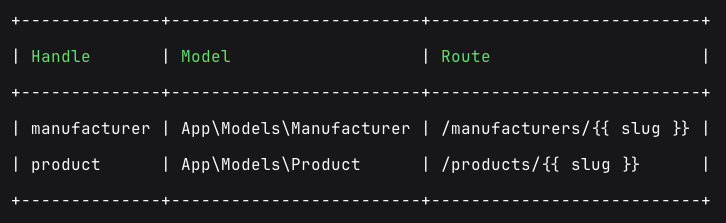
If you're unsure about the handle of a resource, you may want to check it. You may do so with the `php please runway:resources` command which will display a list of Runway Resources.